File verification, APK for armeabi-v7aSignature matches the developer’s certificate
Unmodified file: same certificate as this app’s versions from the official app store, signed by lexun. A signature shows who signed the file, not how the app behaves.
App permissions
Asks first: 9, Special access: 1, Granted automatically: 24
Hi, There you can download APK file "Launcher 8" for Android free, apk file version is 3.5.9 to download to your android device just click this button. It's easy and warranty. We provide only original apk files. If any of materials on this site violates your rights, report us
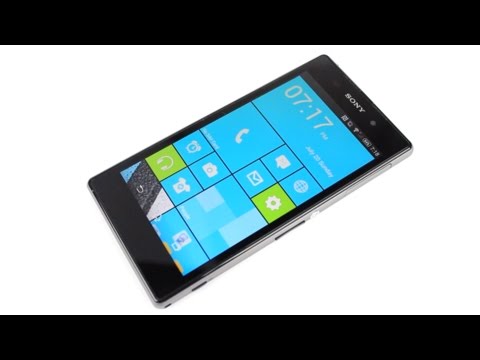
Need to put Windows on your Android phone? How to convert Android into Windows?
Want to try a new style like Windows Phone?
Launcher 8, is an excellent app for you to experience the Windows phone UI style on your Android devices. It will make your Android phone's homescreen looks like a Windows Phone.
With this fast, clean launcher, you can customize personalized Windows phone layout for your Android phone. Just surprise your friend with the new launcher on your android phone! Also, don’t forget to share your wonderful themes designed by yourself after learning how to use this launcher, may be your theme will be loved by all of us!
If you have any questions about Launcher 8, just feel free to let us know. Please contact us via Email.
Or our Facebook: https://www.facebook.com/launcher8
Features
- Ads-block: Totally smooth and no-stop in enjoying process;
- Custom tile: Choose different sizes of tiles, modify colors and icons of the tiles;
- Featured tile: You can add special features tiles, like time, LED light, Live Gallery and Live contact.
- LockScreen: Add your thoughts to manage the LockScreen with style and password settings;
- StatusBar: Manage your StatusBar with style, time display, and color settings;
- DIY folder: Create new tabs for folder. Hide & lock folders with password;
- Theme: Back up and restore theme. Themes can be uploaded and downloaded online ;
- Wallpaper: Rich wallpaper resources for background, LockScreen available online, also support dynamic wallpaper;
- Application notifications: DIY the display mode for your application’s message notifications alerts.
- Super search: Bigger and quicker search ability for web and local information.
Reminder
1 The live contact needs to read the contact data (Avatar) access permission;
2 Direct dial call shortcut need the CALL PHONE permission;
3 Direct send text message shortcut need Send Message permission.
4 Download the themes need access the network permission.
5 The LED Light need access the Camera permission.
Note
The notification feature requires manual activation. To activate this service, please follow the instruction: Settings -> General -> Notification settings -> On (under Push).
How to activate the notification of a chosen app?
1. After turning on Notifications, tab “Manage Notifications”.
2. Choose the app you want to display the notification.
3. Set free here in the app settings.
If you have any questions,please post it to this website:
http://www.launcher8.cn/en/Community/Forums
Explore the version history of WP Launcher (Windows Phone Style) for Android and see how the app has evolved over time. This section tracks versions added to the apk.cafe catalog, including download size, declared permissions, and Android compatibility. Select a point on a chart to explore historical version data.
1 new WP Launcher (Windows Phone Style) version was added to the apk.cafe catalog in 2019. The catalog contains 2 versions dating back to June 2017.
The WP Launcher (Windows Phone Style) download size for most phones decreased from 13.44 MB in version 3.4.9 (2017) to 11.83 MB in version 3.5.9, a 12% decrease.
WP Launcher (Windows Phone Style) 3.5.9 declares 34 permissions, 53 fewer than version 3.4.9 from 2017 (87).
WP Launcher (Windows Phone Style) 3.5.9 requires Android 4.0 or newer and is built for Android 8.0.
Older versions of WP Launcher (Windows Phone Style). The apk.cafe catalog has 2 versions of WP Launcher (Windows Phone Style), from 3.4.9 (Jun 2017) to WP Launcher (Windows Phone Style) 3.5.9 (May 15, 2019). If the latest version has a bug, changed something you rely on or does not work on your phone, you can install an earlier one from the list of older WP Launcher (Windows Phone Style) APK versions below.
Android does not install an older version over a newer one, so uninstall WP Launcher (Windows Phone Style) first. This usually deletes the app's data on the phone, so back up anything you need.
Dates show when each version was added to the apk.cafe catalog. Size is the full download for most phones; permissions are for the same build.
A permission shows what the app can access, not that it uses it.
Made for devices with: Rear camera, Camera with autofocus
Changes since 3.4.9.
Removed in this version